OnCrawl
SEO Tech
Designing alerting feature to reduce support tickets by 40%
Product Design
Prototyping
OnCrawl's SEO teams were spending hours manually monitoring dashboards to catch data drops and then calling support when something went wrong. I designed an alerting system that shifted them from reactive monitoring to autonomous action.
-40%
Support tickets
10,000+
Active users
B2B SaaS
SEO analytics
7mo
From kickoff to full adoption
The Challenge
Powerful data.
Always too late.
OnCrawl is an enterprise SEO platform that crawls millions of pages, analyzes log files, and surfaces technical SEO data for global brands. The platform was powerful but users had to check it manually, constantly, to catch anything meaningful. When they missed a drop, they called support every time.
Monitoring by hand, at scale
Users managed 40+ live metrics across multiple crawl projects. There was no way to be notified; you had to log in, look, and hope you noticed. For enterprise SEO teams managing hundreds of URLs, this was unsustainable.
Support as a crutch
When something broke, a crawl drop or an indexation anomaly, users didn't know if it was expected or critical. Their first reflex was to open a support ticket. 40% of tickets were questions the product itself should have answered.
Power users blocked, new users lost
Experts wanted to set custom thresholds and get notified only when it mattered. New users didn't know what to monitor. Both groups were underserved by a product that required deep knowledge to extract value from.
My Approach
My process, step by step.
01
Discovery workshops & user interviews
Ran 3 discovery workshops with SEO leads and 8 user interviews across customer tiers (SMB to enterprise). Mapped the monitoring workflow end-to-end, heatmap, what they feared missing, and what triggered a support call.
02
Jobs-to-be-done framing
Distilled 3 core jobs from research: Know in advance · Act without support · Stay in control without interrupting workflow. These became the design brief. Every alert feature decision was evaluated against these three jobs.
03
Alert system design & progressive complexity
Designed the alert creation flow, notification system, and threshold configuration UI. Built from simple defaults (automatic alerts on major drops) to advanced customisation (custom metrics, percentages, frequency). Validated with unmoderated usability tests.
Key Decision
"The product already had the data. What was missing was a mechanism to push it to users at the right moment. The alert feature didn't add intelligence, it surfaced intelligence that was already there."
The Solution
The data comes to you.
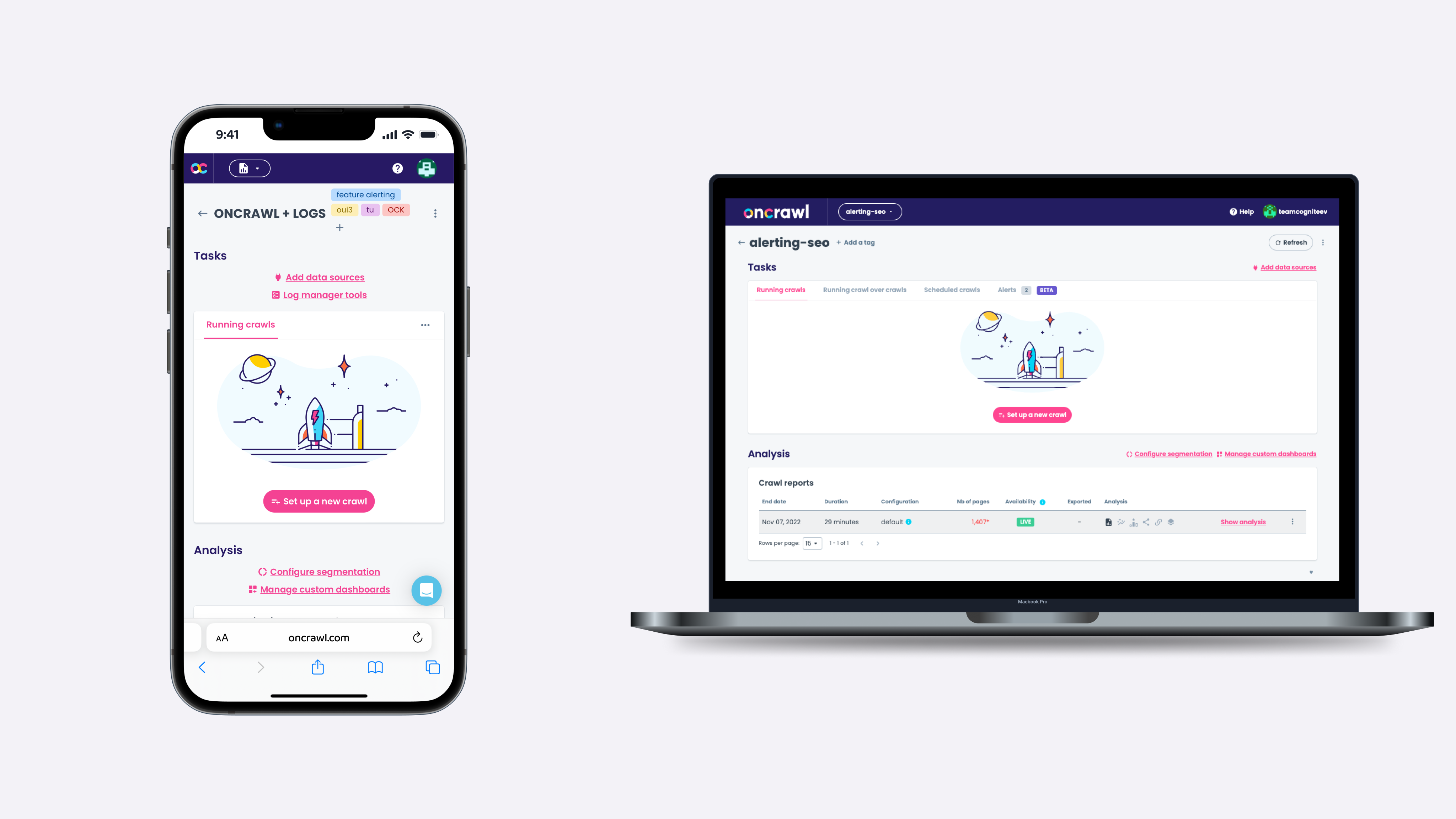
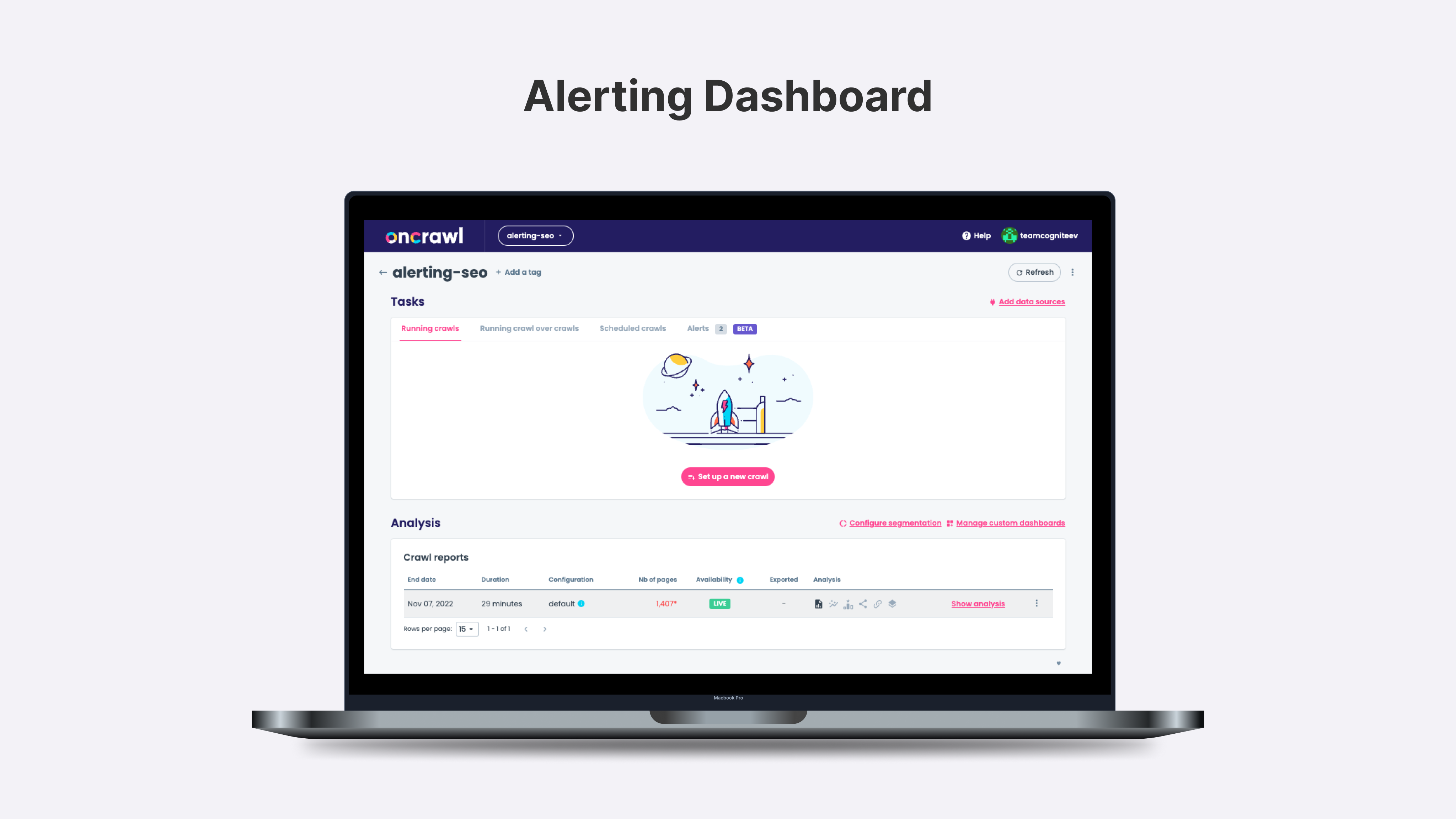
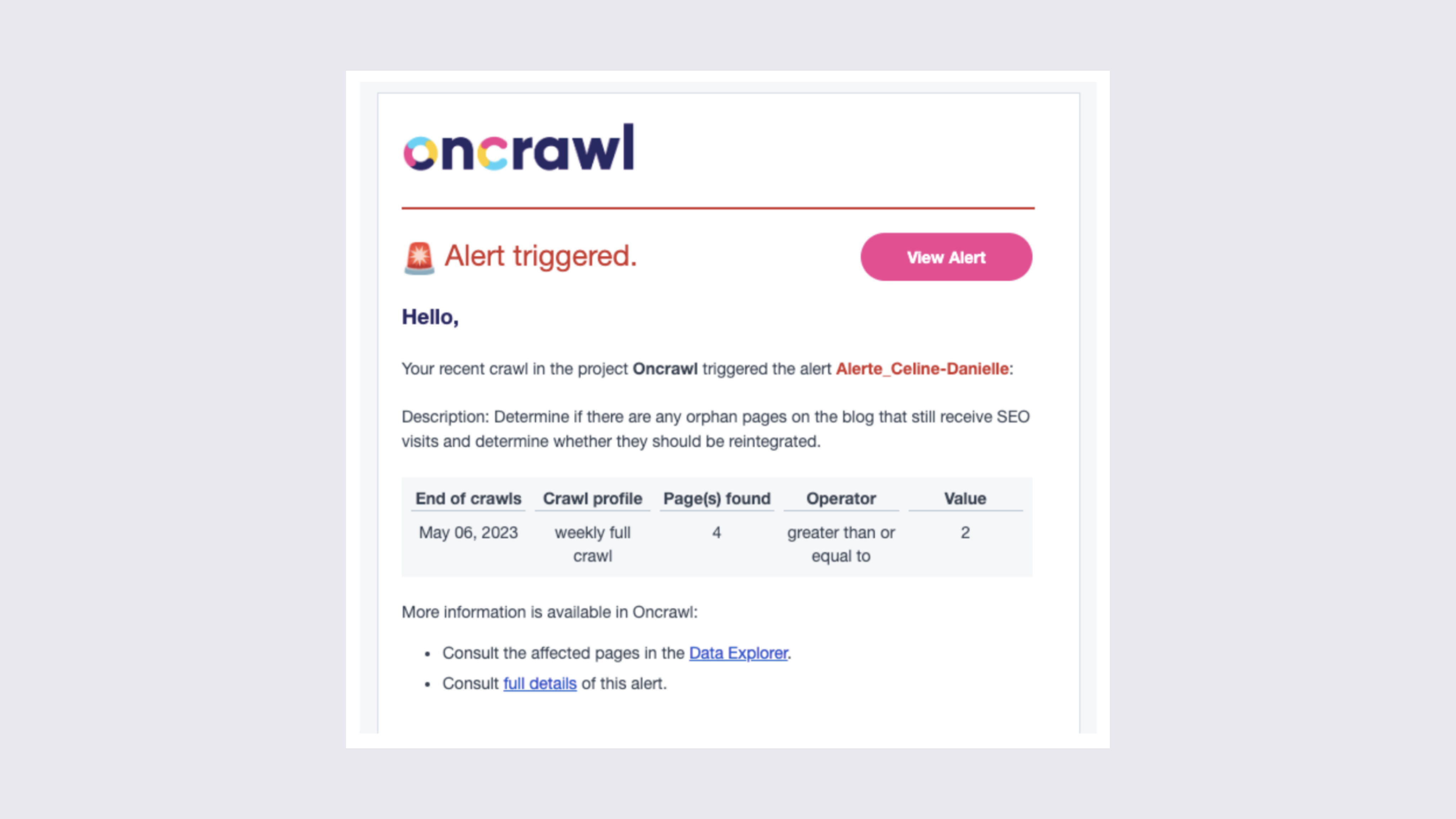
A proactive alerting system embedded into OnCrawl's existing analytics framework. Users define thresholds once, receive contextual notifications when metrics cross them, and can act directly from the alert without navigating to the dashboard.
Impact
Users unblocked. Data finally useful.
What I'd do differently: Include developer handoff documentation earlier. The gap between prototype and production caused 2 weeks of clarification cycles that better specs would have avoided.
-40%
Support tickets
10,000+
Active users
B2B SaaS
SEO analytics
7mo
From kickoff to full adoption
© 2026 Victoria Pereira
Made with Figma
OnCrawl
SEO Tech
Designing alerting feature to reduce support tickets by 40%
Product Design
Prototyping
OnCrawl's SEO teams were spending hours manually monitoring dashboards to catch data drops and then calling support when something went wrong. I designed an alerting system that shifted them from reactive monitoring to autonomous action.
-40%
Support tickets
10,000+
Active users
B2B SaaS
SEO analytics
7mo
From kickoff to full adoption
The Challenge
Powerful data.
Always too late.
OnCrawl is an enterprise SEO platform that crawls millions of pages, analyzes log files, and surfaces technical SEO data for global brands. The platform was powerful but users had to check it manually, constantly, to catch anything meaningful. When they missed a drop, they called support every time.
Monitoring by hand, at scale
Users managed 40+ live metrics across multiple crawl projects. There was no way to be notified; you had to log in, look, and hope you noticed. For enterprise SEO teams managing hundreds of URLs, this was unsustainable.
Support as a crutch
When something broke, a crawl drop or an indexation anomaly, users didn't know if it was expected or critical. Their first reflex was to open a support ticket. 40% of tickets were questions the product itself should have answered.
Power users blocked, new users lost
Experts wanted to set custom thresholds and get notified only when it mattered. New users didn't know what to monitor. Both groups were underserved by a product that required deep knowledge to extract value from.
My Approach
My process, step by step.
01
Discovery workshops & user interviews
Ran 3 discovery workshops with SEO leads and 8 user interviews across customer tiers (SMB to enterprise). Mapped the monitoring workflow end-to-end, heatmap, what they feared missing, and what triggered a support call.
02
Jobs-to-be-done framing
Distilled 3 core jobs from research: Know in advance · Act without support · Stay in control without interrupting workflow. These became the design brief. Every alert feature decision was evaluated against these three jobs.
03
Alert system design & progressive complexity
Designed the alert creation flow, notification system, and threshold configuration UI. Built from simple defaults (automatic alerts on major drops) to advanced customisation (custom metrics, percentages, frequency). Validated with unmoderated usability tests.
Key Decision
"The product already had the data. What was missing was a mechanism to push it to users at the right moment. The alert feature didn't add intelligence, it surfaced intelligence that was already there."
The Solution
The data comes to you.
A proactive alerting system embedded into OnCrawl's existing analytics framework. Users define thresholds once, receive contextual notifications when metrics cross them, and can act directly from the alert without navigating to the dashboard.
Impact
Users unblocked. Data finally useful.
What I'd do differently: Include developer handoff documentation earlier. The gap between prototype and production caused 2 weeks of clarification cycles that better specs would have avoided.
-40%
Support tickets
10,000+
Active users
B2B SaaS
SEO analytics
7mo
From kickoff to full adoption
© 2026 Victoria Pereira
Made with Figma
OnCrawl
SEO Tech
Designing alerting feature to reduce support tickets by 40%
Product Design
Prototyping
OnCrawl's SEO teams were spending hours manually monitoring dashboards to catch data drops and then calling support when something went wrong. I designed an alerting system that shifted them from reactive monitoring to autonomous action.
-40%
Support tickets
10,000+
Active users
B2B SaaS
SEO analytics
7mo
From kickoff to full adoption
The Challenge
Powerful data.
Always too late.
OnCrawl is an enterprise SEO platform that crawls millions of pages, analyzes log files, and surfaces technical SEO data for global brands. The platform was powerful but users had to check it manually, constantly, to catch anything meaningful. When they missed a drop, they called support every time.
Monitoring by hand, at scale
Users managed 40+ live metrics across multiple crawl projects. There was no way to be notified; you had to log in, look, and hope you noticed. For enterprise SEO teams managing hundreds of URLs, this was unsustainable.
Support as a crutch
When something broke, a crawl drop or an indexation anomaly, users didn't know if it was expected or critical. Their first reflex was to open a support ticket. 40% of tickets were questions the product itself should have answered.
Power users blocked, new users lost
Experts wanted to set custom thresholds and get notified only when it mattered. New users didn't know what to monitor. Both groups were underserved by a product that required deep knowledge to extract value from.
My Approach
My process, step by step.
01
Discovery workshops & user interviews
Ran 3 discovery workshops with SEO leads and 8 user interviews across customer tiers (SMB to enterprise). Mapped the monitoring workflow end-to-end, heatmap, what users feared missing, and what triggered a support call.
02
Jobs-to-be-done framing
Distilled 3 core jobs from research: Know in advance · Act without support · Stay in control without interrupting workflow. These became the design brief. Every alert feature decision was evaluated against these three jobs.
03
Alert system design & progressive complexity
Designed the alert creation flow, notification system, and threshold configuration UI. Built from simple defaults (automatic alerts on major drops) to advanced customisation (custom metrics, percentages, frequency). Validated with unmoderated usability tests.
Key Decision
"The product already had the data. What was missing was a mechanism to push it to users at the right moment. The alert feature didn't add intelligence, it surfaced intelligence that was already there."
The Solution
The data comes to you.
A proactive alerting system embedded into OnCrawl's existing analytics framework. Users define thresholds once, receive contextual notifications when metrics cross them, and can act directly from the alert without navigating to the dashboard.
Impact
Users unblocked. Data finally useful.
What I'd do differently: Include developer handoff documentation earlier. The gap between prototype and production caused 2 weeks of clarification cycles that better specs would have avoided.
-40%
Support tickets
10,000+
Active users
B2B SaaS
SEO analytics
7mo
From kickoff to full adoption
© 2026 Victoria Pereira
Made with Figma
OnCrawl
SEO Tech
Designing alerting feature to reduce support tickets by 40%
Product Design
Prototyping
Built a multi-brand design system adopted across 10+ products — cutting design-to-dev handoff by 30% and aligning 5 product teams on a shared visual language.
-40%
Support tickets
10,000+
Active users
B2B SaaS
SEO analytics
7mo
From kickoff to full adoption
The Challenge
Powerful data.
Always too late.
OnCrawl is an enterprise SEO platform that crawls millions of pages, analyzes log files, and surfaces technical SEO data for global brands. The platform was powerful but users had to check it manually, constantly, to catch anything meaningful. When they missed a drop, they called support every time.
Monitoring by hand, at scale
Users managed 40+ live metrics across multiple crawl projects. There was no way to be notified; you had to log in, look, and hope you noticed. For enterprise SEO teams managing hundreds of URLs, this was unsustainable.
Support as a crutch
When something broke, a crawl drop or an indexation anomaly, users didn't know if it was expected or critical. Their first reflex was to open a support ticket. 40% of tickets were questions the product itself should have answered.
Power users blocked, new users lost
Experts wanted to set custom thresholds and get notified only when it mattered. New users didn't know what to monitor. Both groups were underserved by a product that required deep knowledge to extract value from.
My Approach
My process, step by step.
01
Discovery workshops & user interviews
Ran 3 discovery workshops with SEO leads and 8 user interviews across customer tiers (SMB to enterprise). Mapped the monitoring workflow end-to-end, heatmap, what they feared missing, and what triggered a support call.
02
Jobs-to-be-done framing
Distilled 3 core jobs from research: Know in advance · Act without support · Stay in control without interrupting workflow. These became the design brief. Every alert feature decision was evaluated against these three jobs.
03
Alert system design & progressive complexity
Designed the alert creation flow, notification system, and threshold configuration UI. Built from simple defaults (automatic alerts on major drops) to advanced customisation (custom metrics, percentages, frequency). Validated with unmoderated usability tests.
Key Decision
"The product already had the data. What was missing was a mechanism to push it to users at the right moment. The alert feature didn't add intelligence, it surfaced intelligence that was already there."
The Solution
The data comes to you.
A proactive alerting system embedded into OnCrawl's existing analytics framework. Users define thresholds once, receive contextual notifications when metrics cross them, and can act directly from the alert without navigating to the dashboard.
Impact
Users unblocked. Data finally useful.
What I'd do differently: Include developer handoff documentation earlier. The gap between prototype and production caused 2 weeks of clarification cycles that better specs would have avoided.
-40%
Support tickets
10,000+
Active users
B2B SaaS
SEO analytics
7mo
From kickoff to full adoption
© 2026 Victoria Pereira
Made with Figma