STiD
Security Tech
Modernising a B2B identity management platform
UI Design
Mobile Design
STid's mobile access badge app had the right technology but the wrong UX. I led the full iOS + Android redesign — modernising the interface, simplifying navigation, and increasing adoption by 17% post-launch.
+17%
User adoption
60+
Screens redesigned
2
Platforms (iOS + Android)
5mo
From kickoff to full adoption
The Challenge
Powerful technology. Frustrating experience.
STid is a European leader in contactless identification. Their Mobile ID app lets users turn their smartphone into a secure digital access badge : replacing physical cards for building access, restricted zones, and identity verification. The technology worked. The app didn't feel like it.
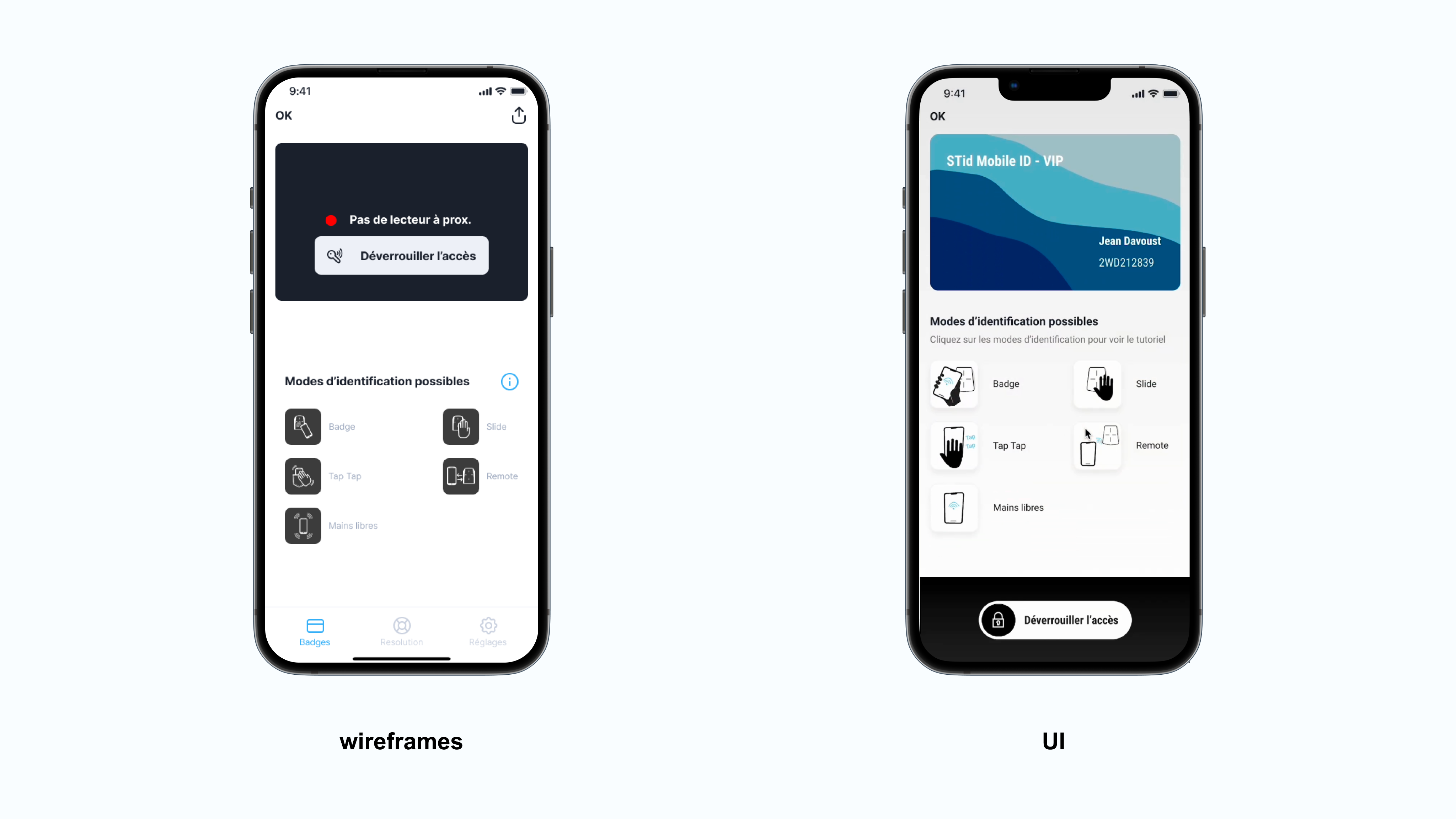
Interface from another era
The visual design was functional but outdated : inconsistent components, weak hierarchy, and low-contrast elements that struggled in real-world conditions: low light, fast badge swipes, security checkpoints. Users hesitated. That hesitation has a cost.
Navigation that fought the core use case
The app's primary action : activating a badge to open a door, was buried behind multiple taps and unclear labels. Users had to learn the app before they could use it. For a daily-use security tool, that friction kills adoption.
No trust at first glance
For an access control app, users need to feel the app is reliable before they even tap. The old interface communicated neither security nor confidence. Adoption was low despite mandated corporate rollouts.
My Approach
My process, step by step.
01
UX audit & flow mapping
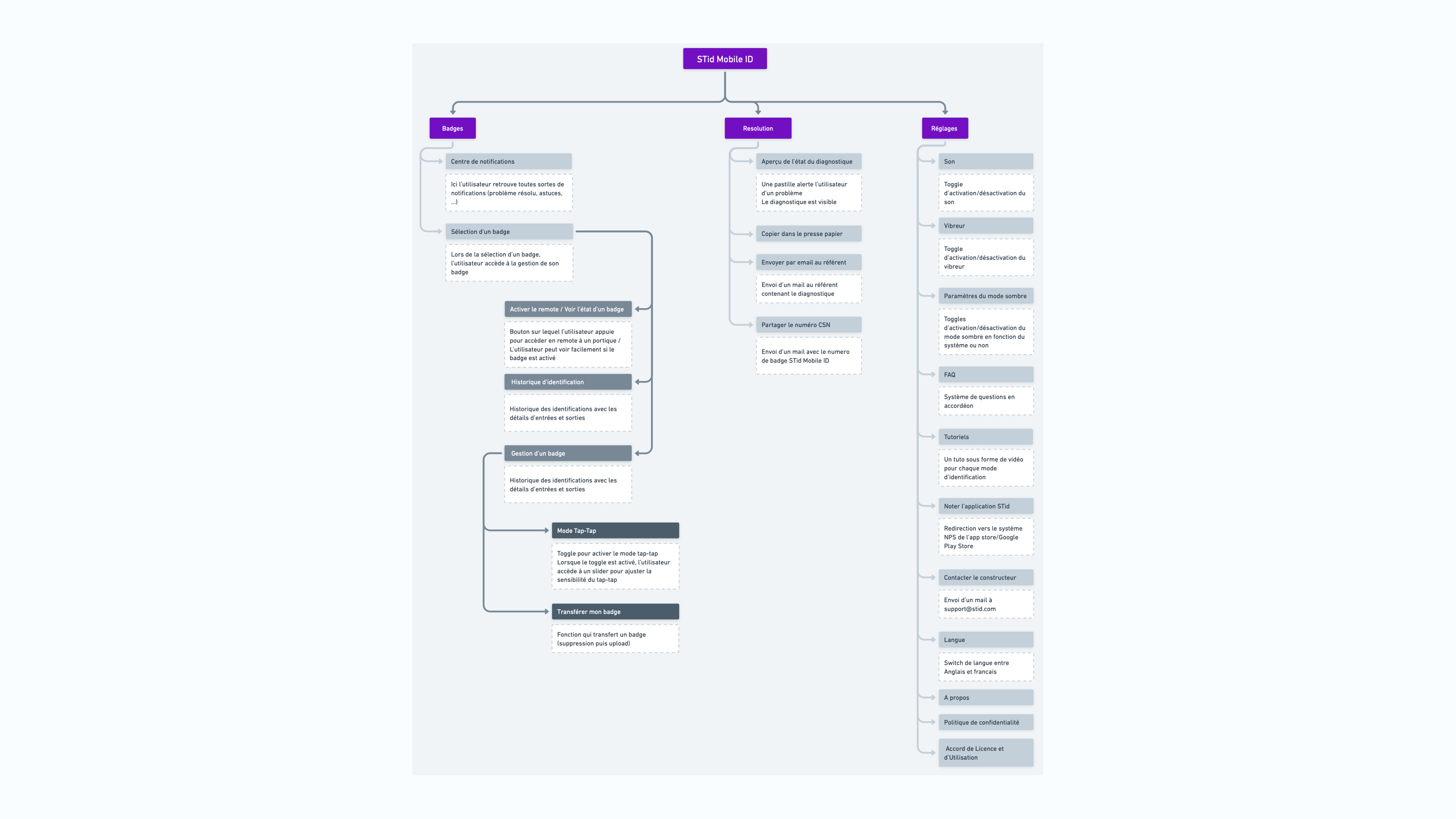
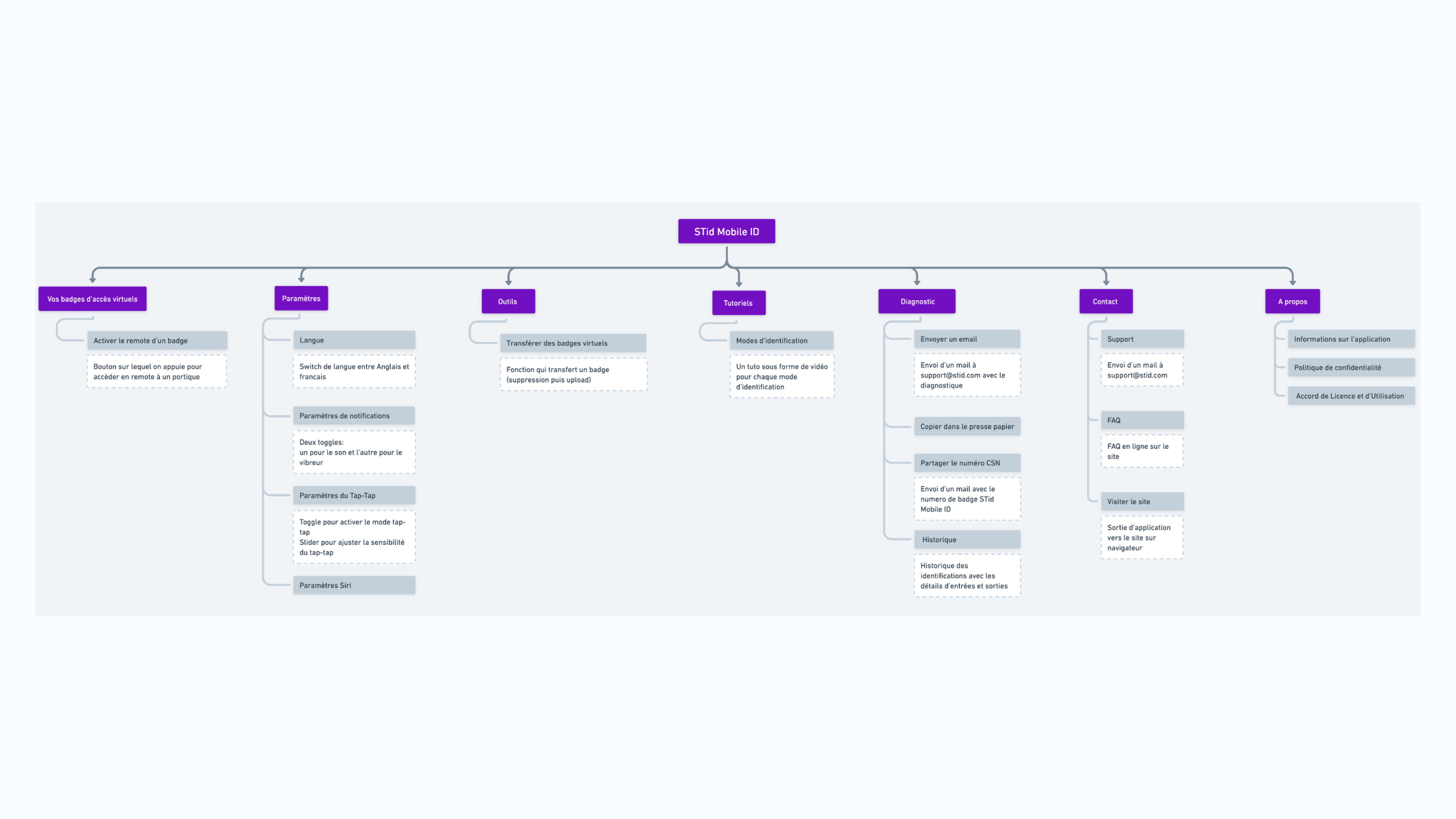
Mapped every user flow in the existing app : identified friction points, dead ends, and over-complicated sequences. Benchmarked against best-in-class identity and access apps. Defined the redesign scope: simplify navigation, modernise visuals, improve accessibility.
02
Navigation restructuring
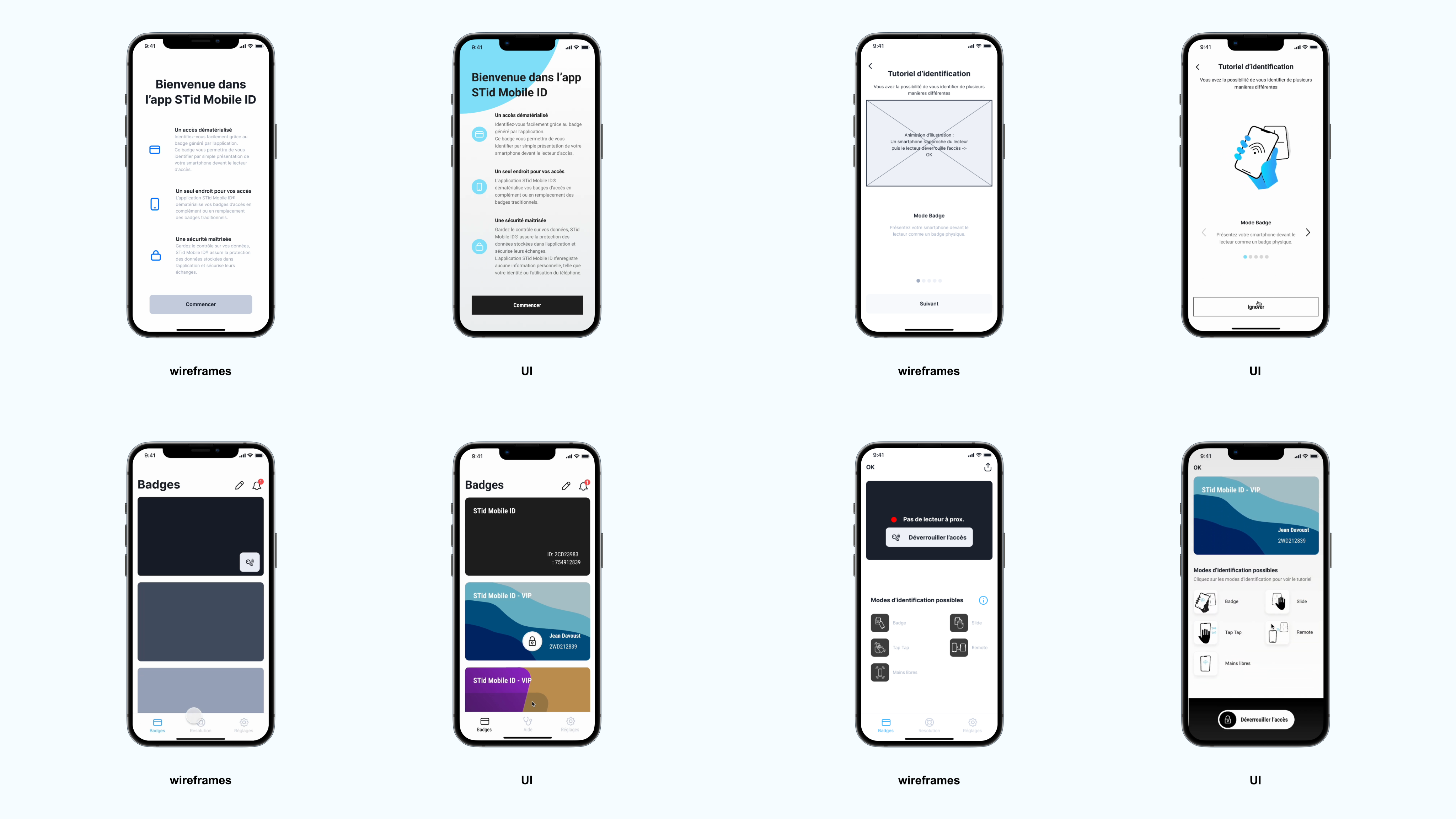
Redesigned the information architecture to put the badge access action front and centre. The primary action went from 4+ taps to 1. Built and validated new flows through prototyping and targeted usability testing sessions.
03
Visual system rebuild
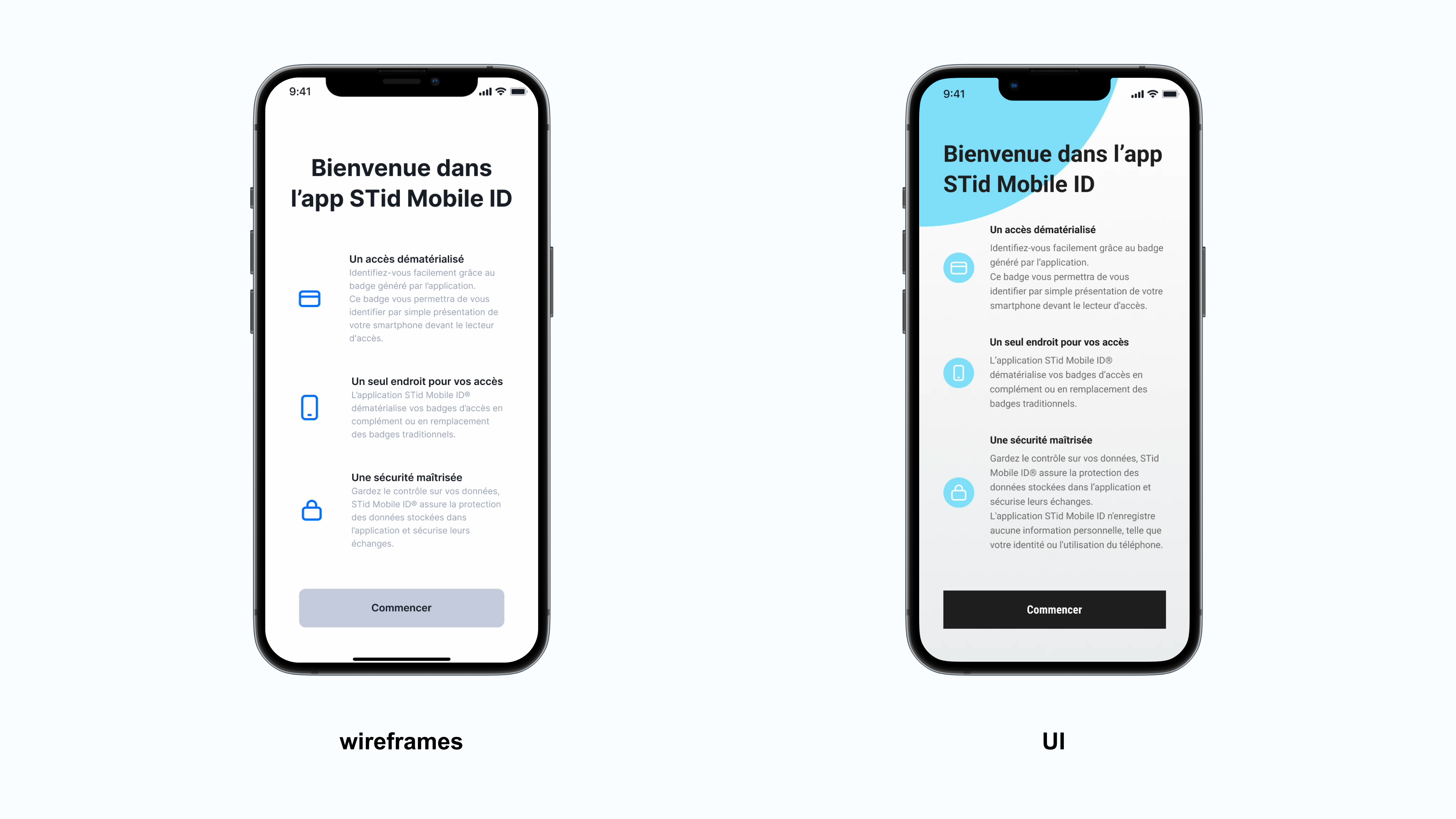
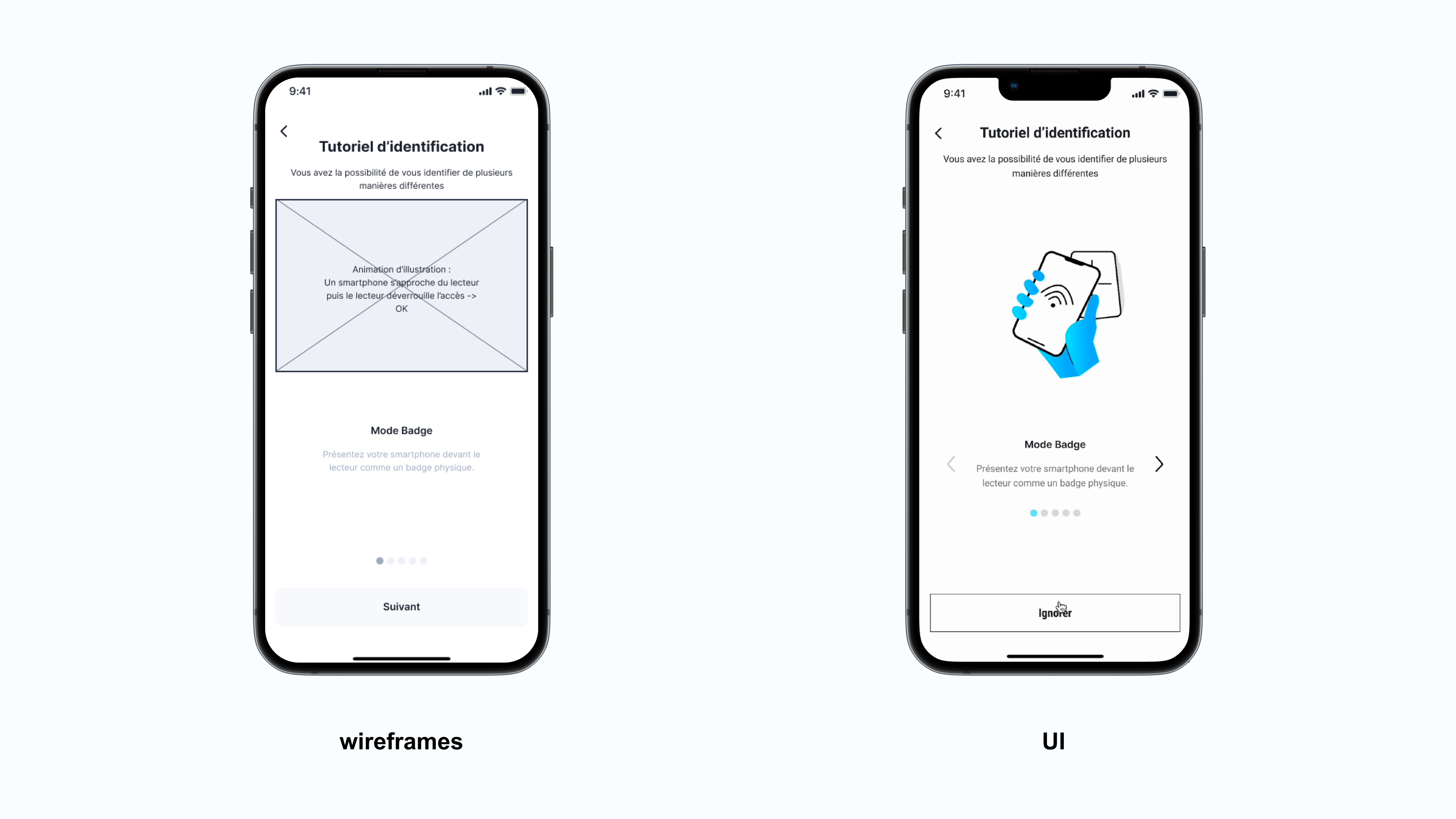
Built a new UI layer from scratch in Figma: new component library covering 60+ screens, dark/light mode, high-contrast accessible colour system, modernised iconography, and motion feedback for badge activation. Delivered full dev specs for both iOS and Android.
Key Decision
"Security apps are held to a higher visual standard than most. When the interface looks unreliable, users don't trust the hardware it controls. The redesign wasn't cosmetic, it was reputational.
The Solution
Security you can feel.
A redesigned mobile experience that makes badge access seamless and confidence-inspiring. New visual system, restructured navigation, and a complete component set built for clean developer handoff across iOS and Android.
Impact
An app worth adopting.
The new version launched to positive user and client feedback. Adoption grew across the corporate accounts using STid Mobile ID : confirming that simplifying the core flow was the right call.
Run usability tests in real access control environments : dim staircases, turnstile gates, quick-swipe scenarios. Lab testing missed friction points that only appeared in real deployment conditions.
+17%
User adoption
60+
Screens redesigned
2
Platforms (iOS + Android)
5mo
From kickoff to full adoption
© 2026 Victoria Pereira
Made with Figma
STiD
Security Tech
Modernising a B2B identity management platform
UI Design
Mobile Design
STid's mobile access badge app had the right technology but the wrong UX. I led the full iOS + Android redesign — modernising the interface, simplifying navigation, and increasing adoption by 17% post-launch.
+17%
User adoption
60+
Screens redesigned
2
Platforms (iOS + Android)
5mo
From kickoff to full adoption
The Challenge
Powerful technology. Frustrating experience.
STid is a European leader in contactless identification. Their Mobile ID app lets users turn their smartphone into a secure digital access badge : replacing physical cards for building access, restricted zones, and identity verification. The technology worked. The app didn't feel like it.
Interface from another era
The visual design was functional but outdated : inconsistent components, weak hierarchy, and low-contrast elements that struggled in real-world conditions: low light, fast badge swipes, security checkpoints. Users hesitated. That hesitation has a cost.
Navigation that fought the core use case
The app's primary action : activating a badge to open a door, was buried behind multiple taps and unclear labels. Users had to learn the app before they could use it. For a daily-use security tool, that friction kills adoption.
No trust at first glance
For an access control app, users need to feel the app is reliable before they even tap. The old interface communicated neither security nor confidence. Adoption was low despite mandated corporate rollouts.
My Approach
My process, step by step.
01
UX audit & flow mapping
Mapped every user flow in the existing app : identified friction points, dead ends, and over-complicated sequences. Benchmarked against best-in-class identity and access apps. Defined the redesign scope: simplify navigation, modernise visuals, improve accessibility.
02
Navigation restructuring
Redesigned the information architecture to put the badge access action front and centre. The primary action went from 4+ taps to 1. Built and validated new flows through prototyping and targeted usability testing sessions.
03
Visual system rebuild
Built a new UI layer from scratch in Figma: new component library covering 60+ screens, dark/light mode, high-contrast accessible colour system, modernised iconography, and motion feedback for badge activation. Delivered full dev specs for both iOS and Android.
Key Decision
"Security apps are held to a higher visual standard than most. When the interface looks unreliable, users don't trust the hardware it controls. The redesign wasn't cosmetic, it was reputational.
The Solution
Security you can feel.
A redesigned mobile experience that makes badge access seamless and confidence-inspiring. New visual system, restructured navigation, and a complete component set built for clean developer handoff across iOS and Android.
Impact
An app worth adopting.
The new version launched to positive user and client feedback. Adoption grew across the corporate accounts using STid Mobile ID : confirming that simplifying the core flow was the right call.
Run usability tests in real access control environments : dim staircases, turnstile gates, quick-swipe scenarios. Lab testing missed friction points that only appeared in real deployment conditions.
+17%
User adoption
60+
Screens redesigned
2
Platforms (iOS + Android)
5mo
From kickoff to full adoption
© 2026 Victoria Pereira
Made with Figma
STiD
Security Tech
Modernising a B2B identity management platform
UI Design
Mobile Design
STid's mobile access badge app had the right technology but the wrong UX. I led the full iOS + Android redesign : modernising the interface, simplifying navigation, and increasing adoption by 17% post-launch.
+17%
User adoption
60+
Screens redesigned
2
Platforms (iOS + Android)
5mo
From kickoff to full adoption
The Challenge
Powerful technology. Frustrating experience.
STid is a European leader in contactless identification. Their Mobile ID app lets users turn their smartphone into a secure digital access badge : replacing physical cards for building access, restricted zones, and identity verification. The technology worked. The app didn't feel like it.
Interface from another era
The visual design was functional but outdated : inconsistent components, weak hierarchy, and low-contrast elements that struggled in real-world conditions: low light, fast badge swipes, security checkpoints. Users hesitated. That hesitation has a cost.
Navigation that fought the core use case
The app's primary action : activating a badge to open a door, was buried behind multiple taps and unclear labels. Users had to learn the app before they could use it. For a daily-use security tool, that friction kills adoption.
No trust at first glance
For an access control app, users need to feel the app is reliable before they even tap. The old interface communicated neither security nor confidence. Adoption was low despite mandated corporate rollouts.
My Approach
My process, step by step.
01
UX audit & flow mapping
Mapped every user flow in the existing app : identified friction points, dead ends, and over-complicated sequences. Benchmarked against best-in-class identity and access apps. Defined the redesign scope: simplify navigation, modernise visuals, improve accessibility.
02
Navigation restructuring
Redesigned the information architecture to put the badge access action front and centre. The primary action went from 4+ taps to 1. Built and validated new flows through prototyping and targeted usability testing sessions.
03
Visual system rebuild
Built a new UI layer from scratch in Figma: new component library covering 60+ screens, dark/light mode, high-contrast accessible colour system, modernised iconography, and motion feedback for badge activation. Delivered full dev specs for both iOS and Android.
Key Decision
"Security apps are held to a higher visual standard than most. When the interface looks unreliable, users don't trust the hardware it controls. The redesign wasn't cosmetic, it was reputational.
The Solution
Security you can feel.
A redesigned mobile experience that makes badge access seamless and confidence-inspiring. New visual system, restructured navigation, and a complete component set built for clean developer handoff across iOS and Android.
Impact
An app worth adopting.
The new version launched to positive user and client feedback. Adoption grew across the corporate accounts using STid Mobile ID : confirming that simplifying the core flow was the right call.
Run usability tests in real access control environments : dim staircases, turnstile gates, quick-swipe scenarios. Lab testing missed friction points that only appeared in real deployment conditions.
+17%
User adoption
60+
Screens redesigned
2
Platforms (iOS + Android)
5mo
From kickoff to full adoption
© 2026 Victoria Pereira
Made with Figma
STiD
B2B · Fintech
Modernising a B2B identity management platform
UI Design
Mobile Design
Built a multi-brand design system adopted across 10+ products — cutting design-to-dev handoff by 30% and aligning 5 product teams on a shared visual language.
+17%
User adoption
60+
Screens redesigned
2
Platforms (iOS + Android)
5mo
From kickoff to full adoption
The Challenge
Powerful technology. Frustrating experience.
STid is a European leader in contactless identification. Their Mobile ID app lets users turn their smartphone into a secure digital access badge : replacing physical cards for building access, restricted zones, and identity verification. The technology worked. The app didn't feel like it.
Interface from another era
The visual design was functional but outdated : inconsistent components, weak hierarchy, and low-contrast elements that struggled in real-world conditions: low light, fast badge swipes, security checkpoints. Users hesitated. That hesitation has a cost.
Navigation that fought the core use case
The app's primary action : activating a badge to open a door, was buried behind multiple taps and unclear labels. Users had to learn the app before they could use it. For a daily-use security tool, that friction kills adoption.
No trust at first glance
For an access control app, users need to feel the app is reliable before they even tap. The old interface communicated neither security nor confidence. Adoption was low despite mandated corporate rollouts.
My Approach
My process, step by step.
01
UX audit & flow mapping
Mapped every user flow in the existing app : identified friction points, dead ends, and over-complicated sequences. Benchmarked against best-in-class identity and access apps. Defined the redesign scope: simplify navigation, modernise visuals, improve accessibility.
02
Navigation restructuring
Redesigned the information architecture to put the badge access action front and centre. The primary action went from 4+ taps to 1. Built and validated new flows through prototyping and targeted usability testing sessions.
03
Visual system rebuild
Built a new UI layer from scratch in Figma: new component library covering 60+ screens, dark/light mode, high-contrast accessible colour system, modernised iconography, and motion feedback for badge activation. Delivered full dev specs for both iOS and Android.
Key Decision
"Security apps are held to a higher visual standard than most. When the interface looks unreliable, users don't trust the hardware it controls. The redesign wasn't cosmetic, it was reputational.
The Solution
Security you can feel.
A redesigned mobile experience that makes badge access seamless and confidence-inspiring. New visual system, restructured navigation, and a complete component set built for clean developer handoff across iOS and Android.
Impact
An app worth adopting.
The new version launched to positive user and client feedback. Adoption grew across the corporate accounts using STid Mobile ID : confirming that simplifying the core flow was the right call.
Run usability tests in real access control environments : dim staircases, turnstile gates, quick-swipe scenarios. Lab testing missed friction points that only appeared in real deployment conditions.
+17%
User adoption
60+
Screens redesigned
2
Platforms (iOS + Android)
5mo
From kickoff to full adoption
© 2026 Victoria Pereira
Made with Figma